
Smart Plans - Multi Planner3.0.3 - App Store
You'll be able to see results in few seconds.
Publisher Description
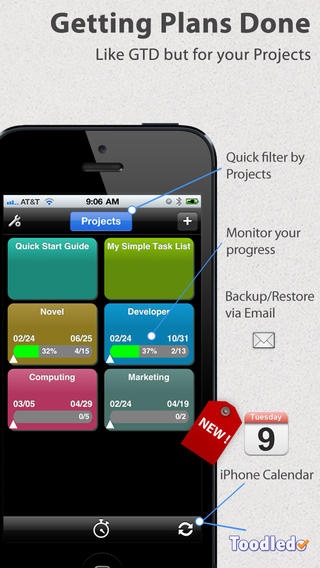
SmartPlans is a flexible project planner and task manager. It's "Smart" because it manages the time that you allocate to your various projects, while maintaining the balance that you need to get everything done - meetings, customer contacts, simple tasks, and complex projects. And now, SmartPlans 3 integrates with our other productivity apps by way of your iOS Calendar.
With SmartPlans you can also create simple unstructured "to do" lists, record the time of multiple tasks and calls (great for managing contacts and customer billing), and even track your life balance goals.
How it works:
Create a project.
Fill it with tasks. Add more later.
Drag and drop to group tasks into Milestones, with alerts and deadlines.
Flip your iPhone or iPad sideways to manage multiple projects from the Gantt view.
View your Milestones and Tasks directly in your iPhone or iPad Calendar app.
Now sync Calendar with any of our productivity apps - SmartCal (iPhone), SmartPad (iPad) and SmartDay (Mac) - and they will automatically schedule in your other tasks and appointments into your current day.
There. Now you have everything from the forest to the trees. Even acorns.
New in SmartPlans 3.0
Cascading Gantt view shows project detail (milestones, tasks)
Milestones with critical path and deadline alerts
Dependencies: link any project to another project's milestone
Sync milestones and tasks to the Calendar app (Warning: May be incompatible with some iCloud calendars)
Key Features in SmartPlans 3.0
Create simple task lists as Free-style projects
Group tasks and sub-tasks
Create critical path projects with Milestones
Milestones automatically have deadlines and pop-up alerts
Link any Project to a Milestone from another Project
Simple graph shows progress against plan, for each Project
Gantt chart shows work balance of all Projects, drag/move/resize to manage
Link up to 6 Contexts to your Projects to monitor your life balance goals
Timer keeps audit record of all tasks, calls. Great for customer billing.
Export reports to CSV/Excel
Synchronize Milestones to Calendar as All-Day Events
Synchronize Tasks to Calendar as Recurring Events
Optionally, sync tasks with Toodledo
BEFORE YOU SYNC: PLEASE READ THE SYNC GUIDE ON OUR WEB SITE.
STABILITY: SmartPlans is very stable and has been tested on all iOS devices by our own testing team, and by public users such as yourselves. If you experience any stability issues, it may be a corrupt install from iTunes. Simply remove SmartPlans from your device and re-install. This should solve the issue. Be sure to back up your data often!
Planned:
Export projects to CSV/Excel
Sync directly with our SmartDay apps (iPhone, iPad, Mac, Web)
SmartPlans web version (free for SmartPlans owners)
Enterprise version (upgrade) for plan sharing and delegation
Requires iOS 5.0 or later. Compatible with iPhone, iPad, and iPod touch.
About Smart Plans - Multi Planner
The company that develops Smart Plans - Multi Planner is Left Coast Logic. The latest version released by its developer is 3.0.3.
To install Smart Plans - Multi Planner on your iOS device, just click the green Continue To App button above to start the installation process. The app is listed on our website since 2010-01-20 and was downloaded 0 times. We have already checked if the download link is safe, however for your own protection we recommend that you scan the downloaded app with your antivirus. Your antivirus may detect the Smart Plans - Multi Planner as malware if the download link is broken.
How to install Smart Plans - Multi Planner on your iOS device:
- Click on the Continue To App button on our website. This will redirect you to the App Store.
- Once the Smart Plans - Multi Planner is shown in the iTunes listing of your iOS device, you can start its download and installation. Tap on the GET button to the right of the app to start downloading it.
- If you are not logged-in the iOS appstore app, you'll be prompted for your your Apple ID and/or password.
- After Smart Plans - Multi Planner is downloaded, you'll see an INSTALL button to the right. Tap on it to start the actual installation of the iOS app.
- Once installation is finished you can tap on the OPEN button to start it. Its icon will also be added to your device home screen.
Program Details
System requirements
Download information
Pricing
Version History
version 3.0.3
posted on 2010-01-20
Disclaimer
Official App Store Link
We do not host Smart Plans - Multi Planner on our servers. We did not scan it for viruses, adware, spyware or other type of malware. This app is hosted by Apple and passed their terms and conditions to be listed there. We recommend caution when installing it.
The App Store link for Smart Plans - Multi Planner is provided to you by apps112.com without any warranties, representations or guarantees of any kind, so access it at your own risk.
If you have questions regarding this particular app contact the publisher directly. For questions about the functionalities of apps112.com contact us.
